You are using an out of date browser. It may not display this or other websites correctly.
You should upgrade or use an alternative browser.
You should upgrade or use an alternative browser.
🏈 New Software discussion thread—pre-tutorial, if you will...post your questions and observations here
- Thread starter TerryP
- Start date


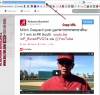
Over on the old software's platform you had to get the HTML code and paste that to embed a tweet.
It's a bit different here.
1) Click on the tweet you want to embed.
2) Click Details at the bottom of the tweet.
3) Copy the url from your browser window.
Simply paste the url.
See attached picture...
It's a bit different here.
1) Click on the tweet you want to embed.
2) Click Details at the bottom of the tweet.
3) Copy the url from your browser window.
Simply paste the url.
See attached picture...
Attachments

planomateo
Member
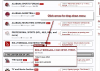
I don't have it linked here as of yet. You can click here to get there right now.
It is listed in the Forum Index.
You can also click "Forums" in the top nav bar to get to the index in the future. See the attached picture below for a little more detail.
TWITTER FEEDS: I'll have those in place, soon, I hope.
In the interest of full disclosure (with a hope someone here might know how to write in php) I've tried, and failed so far, to get the code written correctly to embed the twitter widgets like we had on the old software. Simply put, it's a work in progress.
In the next 24 hours or so I'll have some temporary solutions in place to keep you guys up to date on the latest news about Alabama Athletics—through both our news feeds and twitter feeds. How long before I have it refined to the point I like the way it looks?
Odds are currently being taken.
Until that point keep in mind that the latest news is also available on the Home page. That, like some of the other pages here, is being refined as well. You'll likely find a few news articles that pop up that have nothing to do with Bama. I'm slowly, but surely, getting those out.
It is listed in the Forum Index.
You can also click "Forums" in the top nav bar to get to the index in the future. See the attached picture below for a little more detail.
TWITTER FEEDS: I'll have those in place, soon, I hope.
In the interest of full disclosure (with a hope someone here might know how to write in php) I've tried, and failed so far, to get the code written correctly to embed the twitter widgets like we had on the old software. Simply put, it's a work in progress.
In the next 24 hours or so I'll have some temporary solutions in place to keep you guys up to date on the latest news about Alabama Athletics—through both our news feeds and twitter feeds. How long before I have it refined to the point I like the way it looks?
Odds are currently being taken.
Until that point keep in mind that the latest news is also available on the Home page. That, like some of the other pages here, is being refined as well. You'll likely find a few news articles that pop up that have nothing to do with Bama. I'm slowly, but surely, getting those out.

I can do that if that's what's needed. I just couldn't figure it out.
Email me what your signature is and i will get it loaded, it should have a section now to upload it though
planomateo
Member

Just a thought/idea to add to the site. At lots of forums I have been to, there is a drop down menu type of bar at the bottom of the page with links to all of the different sections to easily go to. That way you wouldn't have to go back thru the forums page to get to another section.
You see the nabtab at the top that says "Under Construction?" It'll be there...got a few things to do before I get to that...but, working on it.


Thanks for the responses guys. So, if I understand correctly, the iphone app is no longer serviceable?
Pretty much.
Basic reasoning behind moving away from it is there is no reason to continue it's use (that we've realized.)

Just to see if it will post on a iPhone.
Trying a android now
How many phones do you have rick4bama?
Have a iPhone, but it not a phone now.They've probably got the same number...it's a chore for him to figure out which to answer, I'm betting...
My daughter got a android for me and that is what I'm using now.
I just wanted to see how both would work, that is the reason I did both.
Now that funny Terry.
Sorry for the delay, but I just saw this.


is there a setting for when you log in that you will only see NEW posts, and those threads highlighted?
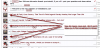
when I try and enter a "Custom Title", I get this...Please enter a value for all required fields.
what am I doing wrong?
Psychojoe mention that via PM earlier today...you filling out "Favorite team" option? There's a tweak in there I've not looked for yet...but will.
See pic for new post (ignore the typo.)
Attachments
planomateo
Member
The auto draft feature is pretty slick too.
Example, go to a thread, start typing your reply, but don't hit "Post Reply". Go to another thread, then come back to the thread you were typing your reply...its still there, just not submitted.
I've been thankful for that a few times already...get lost trying to say something and change sites without changing tabs...comes in handy so you don't end up having to re-type everything you just said.
-

Thread 'Spring Practice 2026: Reports and Update'
Practice (#5) resumes next week following spring break- Justneedme81
- Replies: 74
-

Thread '⛈ The weather thread. The south is waking up and spring work has begun'
What's on your 'project list' for '26?- bamaledge
- Replies: 363
-

🏈 - 2026 Alabama Roster Management Chart and Portal news
The latest on who's in and who's out.- Brandon Van de Graaff
- Replies: 1,655
-

-
Thread 'Anybody watched any good new shows or series lately?'
The off-season "blues." What to watch?- Brandon Van de Graaff
- Replies: 217