šŸ“£ We're updating the News feeds (IE: NewsBots in the sub navigation bar) starting Wednesday evening.

My issue is that when you use the down arrow to scroll to bottom, you now have to scroll back up to go to next page/end of thread. Also, the quick link to go back to main page of forum (Fansights) is below the similar threads so have to scroll through them each time to jump back to main forum.
 
My issue is that when you use the down arrow to scroll to bottom, you now have to scroll back up to go to next page/end of thread. Also, the quick link to go back to main page of forum (Fansights) is below the similar threads so have to scroll through them each time to jump back to main forum.
I'd dare say you won't find a soul on this earth that hates a bad UI (user interface) more than I. That's something I'd be willing to bet on, ya know? I understand frustrations dealing with such--at work I have to have things like this change practically daily.

But here I don't get what you're saying. No matter where you are or what device you're using you don't have to scroll unless you're reading through a thread.

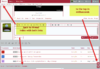
If you're on your PC there's three options with the top, right return to Fansights always at the top (not to mention the up/down arrows follow you're scrolling.)

5.png

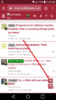
With mobile, it's two clicks and the top menu, continuous scroll, is always an option. Once "Forums" are opened they remain open.

Screenshot_2018-02-01-11-02-55[323].png
screenshot2.png

And again, the arrows are always there for you to use.

screenshot3.png
 
As far as the similar threads ... it only goes back two years, to date, to keep everything that's popping up relevant. If you want to go back farther than that the advanced search option (top right, click advanced) will take you back even farther. I've got it set pretty specifically to avoid looking for words (like which, who, have, etc.) as well as filtering out any word that is four characters or less.
 
Back
Top Bottom